
Folder → sheet of links
Get a link for every file in a Google Drive folder, in one sheet.
Drive will copy links for files you select, but they’re share links, which open a preview page and won’t show as an image on a website. thefilosphere is a Chrome extension that does it in one go: it lists every file in a folder with its share link, grouped by subfolder, as a Google Sheet, a CSV file or text you can paste.

“I really liked the UI of this extension & would prefer spending hours using this extension for my work over google drive's difficult to navigate UI . Being a catalogue specialist, the link sheet feature is my fav and lifesaver because it gives me shareable and viewable links of 1000-1500 images every week in just a couple of seconds..”
How it works
- Choose the folder: one thefilosphere uploaded, or paste the link of any folder shared as “Anyone with the link”.
- Pick the links you want: the Drive page link, the direct image link, or both.
- Press Generate. Every file is added to the list. In a folder thefilosphere uploaded, each file is first set to “Anyone with the link can view”.
- Take the result as a Google Sheet, a CSV download, or copy all the rows.
Two kinds of link on every row
A normal Drive share link opens Google’s preview page, not the file. Paste it where a website wants an image address, and the image won’t show.
Each row can carry two links: the Drive page link, and for images, a Google Drive direct link that opens just the image.
- Drive page link. Opens the file in Google Drive with its preview. Use it when a person will click it.
- Direct image link. Opens just the image, with no Drive page around it. Use it where a site or a spreadsheet import asks for an image URL, such as a product upload sheet. It shows the image full size, and it can show the picture inside a Google Sheets cell (with the =IMAGE formula).
What the sheet looks like
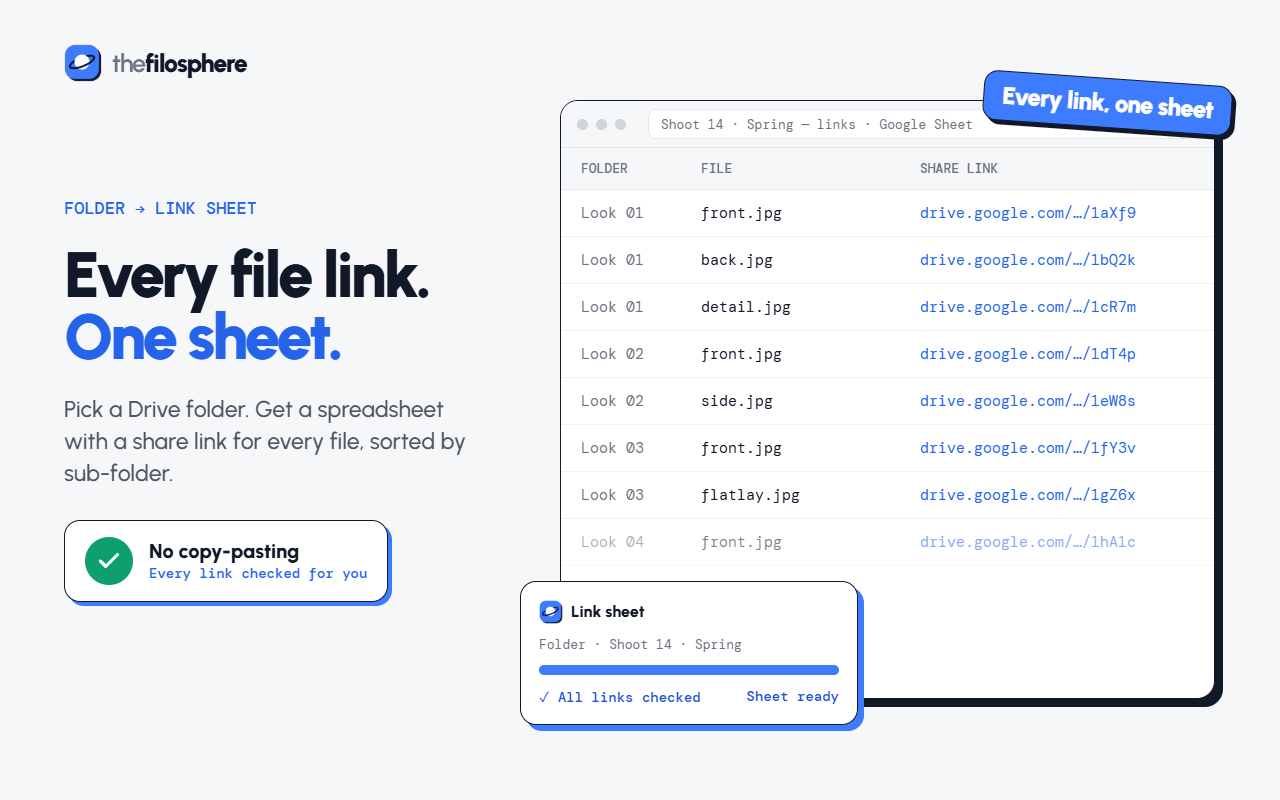
One row per file, with the folder, the file name and its links. Rows are grouped by subfolder and sorted naturally, so the sheet follows the same order as your Drive folder. Before you get the sheet, you see how many files are included, and any file that couldn’t be shared is listed by name.
Good to know before you start
- To be opened by a link, a file has to be shared as “Anyone with the link can view”. In a folder thefilosphere uploaded, it sets that for you, and Undo makes the files private again. For any other folder, you share it that way in Drive yourself, and thefilosphere doesn’t change its sharing.
- For a folder you made by hand, set the folder itself to “Anyone with the link” in Drive first, then paste its link. Google does not let the extension look inside a private folder it did not create.
- It runs in Google Chrome on a laptop or desktop.
- Keep the side panel open until the links are made.
Other ways, and when they’re better
A link sheet isn’t the only way to get there. Here’s when something else fits better.
Drive Explorer. An add-on you install into Google Sheets. It lists a folder’s files and links in a sheet, and can make image links too. Better if you’d rather work from inside Sheets.
Apps Script. A small piece of code you paste into a Google Sheet and run. Free. Better if you’re comfortable with code.
One-link generators like Row.so or GetRawLink. Websites that turn one Drive link into a direct link. Better for a few files, one at a time.
thefilosphere. Better for a whole folder, with every file’s name beside its links. The folder has to be one it uploaded, or one shared as “Anyone with the link”, and it runs in Chrome on a computer.
Questions
How do I get a direct image link from Google Drive?
A normal Drive link opens a preview page, not the image itself. thefilosphere adds a direct link to each image: a Google Drive link that returns only the image, which is what sites and import sheets expect when they ask for an image URL. The file must be shared as “Anyone with the link”.
Is “Anyone with the link” safe?
Only someone who has the exact link can open the file, and it does not appear in search. If you change your mind, Undo in thefilosphere makes the files it shared private again. Folders you shared yourself stay as you set them.
Can I get the links as a CSV or in Excel?
Yes. Download the list as a CSV file, which opens in Excel and any spreadsheet app, or copy all the rows and paste them wherever you need them. You can also create a Google Sheet in one click.
Does it work on a folder with subfolders?
Yes. It goes through every subfolder and groups the rows by subfolder, so you can see where each file lives.
Why doesn’t my Google Drive image link work on my website?
Because a normal Drive link opens Google’s preview page, not the image. A website needs a link that returns just the image. thefilosphere adds that direct link next to each image. It sets the files to “Anyone with the link” so the links open, and Undo makes them private again.
How do I get image URLs for many product photos at once?
Put the photos in one Drive folder. In thefilosphere’s Link sheet, choose the folder, pick the direct image link and press Generate, then Create a Google Sheet. You get one row per photo: its name and its image link. The folder has to be one thefilosphere uploaded, or one shared as “Anyone with the link”.